


Puede capturar eventos de entrada del usuario en la aplicación. Para ello, puede implementar un bloque de funciones que se ejecute cuando se produzcan eventos de usuario.
Captura de la escritura de variables
Cuando el usuario completa la introducción de un valor (en un campo de entrada), se cierra un evento de control de edición. Puede capturar este evento en la aplicación de la siguiente manera.
-
Cree un bloque de funciones que implemente la interfaz
VisuElems.IEditBoxInputHandlerde la bibliotecaVisuElemBase. -
Pasa la instancia al gestor global de eventos
VisuElems.Visu_Globals.g_VisuEventManagerllamando al métodoSetEditBoxEventHandler.
Ejemplo
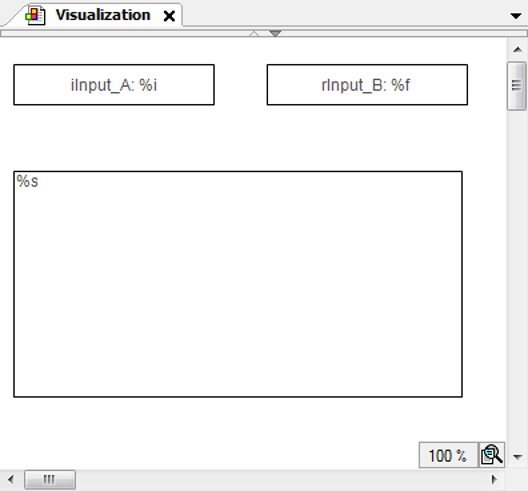
Una visualización tiene dos campos de entrada para iInput_A y rInput_B y un elemento de salida de texto.
Los campos de entrada son rectángulos en los que el usuario debe hacer clic para introducir texto.
El elemento de salida de texto es un rectángulo en el que se imprime el contenido
de la variable de texto PLC_PRG.stInfo. La variable de texto contiene la última entrada realizada por un usuario en uno
de los campos de entrada y la información adicional que se ha añadido.
|
Propiedades del rectángulo |
|
|
«Textos Texto» |
|
|
«Variables de texto Variable de texto» |
PLC_PRG.iInput_A |
|
Propiedades del rectángulo |
|
|
«Textos Texto» |
|
|
«Variables de texto Variable de texto» |
PLC_PRG.rEntr_B |
|
Propiedades del rectángulo para la salida de texto |
|
|
«Textos Texto» |
|
|
«Variables de texto Variable de texto» |
PLC_PRG.stInfo |
PLC_PRG aplicación
PROGRAM PLC_PRG
VAR_INPUT
	iInput_A:INT;  (* Used in the visualization as user input variable*)
	rInput_B:REAL; (* Used in the visualization as user input variable*)
	stInfo : STRING;  (* Informs about the user input via the edit control field;
		String gets composed by method 'VariableWritten;
		Result is displayed in the lower rectangle of the visualization *)
END_VAR
VAR
	inst : POU;
	bFirst : BOOL := TRUE;
END_VAR

IF bFirst THEN
	bFirst := FALSE;
	VisuElems.Visu_Globals.g_VisuEventManager.SetEditBoxEventHandler(inst);
	(* Call of method VariableWritten *)
END_IF
POU aplicación
FUNCTION_BLOCK POU IMPLEMENTS VisuElems.IEditBoxInputHandler
(* no further declarations, no implementation code *)
Método VariableWritten asignado a POU
METHOD VariableWritten : BOOL
(* provides some information always when an edit control field is closed in the visualization, that is a variable gets written by user input in one of the upper rectangles *)
VAR_INPUT
	pVar : POINTER TO BYTE;
	varType : VisuElems.Visu_Types;
	iMaxSize : INT;
	pClient : POINTER TO VisuElems.VisuStructClientData;
END_VAR

// String stInfo, which will be displayed in the lower rectangle, is composed here
PLC_PRG.stInfo := 'Variable written; type: ';
PLC_PRG.stInfo := CONCAT(PLC_PRG.stInfo, INT_TO_STRING(varType));
PLC_PRG.stInfo := CONCAT(PLC_PRG.stInfo, ', adr: ');
PLC_PRG.stInfo := CONCAT(PLC_PRG.stInfo, DWORD_TO_STRING(pVar));
PLC_PRG.stInfo := CONCAT(PLC_PRG.stInfo, ', by: ');
PLC_PRG.stInfo := CONCAT(PLC_PRG.stInfo, SEL(pClient^.globaldata.clienttype = VisuElems.Visu_ClientType.Targetvisualization,'other visu', 'targetvisu'));
Captura de eventos de teclado
Cuando el usuario pulsa y suelta la tecla, se activa un evento de teclado en la visualización. Puede capturar este evento en la aplicación de la siguiente manera.
-
Cree un bloque de funciones que implemente
VisuElems.IVisuUserEventManagerdesde la bibliotecaVisuElemBase. -
Pasa la instancia al gestor global de eventos
VisuElems.Visu_Globals.g_VisuEventManagerllamando al métodoSetKeyEventHandler.
Ejemplo
Una visualización tiene un elemento de salida de texto. El elemento de salida de texto
es un rectángulo en el que se imprime el contenido de la variable de texto PLC_PRG.stInfo. La variable de texto contiene información sobre la última tecla pulsada por el usuario.
|
Propiedades del rectángulo para la salida de texto |
|
|
«Textos Texto» |
|
|
«Variables de texto Variable de texto» |
PLC_PRG.stInfo |
Aplicación del programa PLC_PRG
PROGRAM PLC_PRG
VAR_INPUT
	stInfo : STRING;
END_VAR
VAR
	inst : POU;
	bFirst : BOOL := TRUE;
END_VAR

IF bFirst THEN
	bFirst := FALSE;
	VisuElems.Visu_Globals.g_VisuEventManager.SetKeyEventHandler(inst);
END_IF
Implementación del bloque de funciones POU
FUNCTION_BLOCK POU IMPLEMENTS VisuElems.IKeyEventHandler
(* no further declarations, no implementation code *)
Aplicación del método VariableWritten del bloque de funciones POU
/// This method will be called after a key event is released.
/// RETURN:
/// TRUE - When the handler has handled this event and it should not be handled by someone else
/// FALSE - When the event is not handled by this handler
METHOD HandleKeyEvent : BOOL
VAR_INPUT
	/// Event type. The value is true if a key-up event was released.
	bKeyUpEvent : BOOL;
	/// Key code
	dwKey : DWORD;
	/// Modifier. Possible values:
	/// VISU_KEYMOD_SHIFT : DWORD := 1;
	/// VISU_KEYMOD_ALT : DWORD := 2;
	/// VISU_KEYMOD_CTRL : DWORD := 4;
	dwModifiers : DWORD;
	/// Pointer to the client structure were the event was released
	pClient : POINTER TO VisuStructClientData;
END_VAR
VAR
END_VAR

PLC_PRG.stInfo := 'KeyEvent up: ';
PLC_PRG.stInfo := CONCAT(PLC_PRG.stInfo, BOOL_TO_STRING(bKeyUpEvent));
PLC_PRG.stInfo := CONCAT(PLC_PRG.stInfo, ', key: ');
PLC_PRG.stInfo := CONCAT(PLC_PRG.stInfo, DWORD_TO_STRING(dwKey));
PLC_PRG.stInfo := CONCAT(PLC_PRG.stInfo, ', modifier: ');
PLC_PRG.stInfo := CONCAT(PLC_PRG.stInfo, DWORD_TO_STRING(dwModifiers));
PLC_PRG.stInfo := CONCAT(PLC_PRG.stInfo, ', by: ');
PLC_PRG.stInfo := CONCAT(PLC_PRG.stInfo, SEL(pClient^.globaldata.clienttype =
                                             VisuElems.Visu_ClientType.Targetvisualization,
																																													'other visu', 'targetvisu'));
Registro de los cambios de valor de las variables provocados por eventos de entrada
Todos los elementos de visualización que cambian el valor de una variable mediante
la entrada del usuario llaman a la interfaz IValueChangedListener. Con esta interfaz, los cambios de valor pueden registrarse y luego procesarse mediante
programación.
-
Implemente un bloque de funciones (ejemplo:
POU) que implemente la interfazIValueChangedListener.FUNCTION_BLOCK POU IMPLEMENTS VisuElems.IValueChangedListenerEn el árbol de dispositivos, el método «ValueChanged» se inserta debajo del bloque de funciones.
-
En un programa (ejemplo: «PLC_PRG»), implemente el código IEC que registra la interfaz.
VisuElems.g_itfValueChangedListenerManager.AddValueChangedListener(itfValueChangedListener)«PLC_PRG» recibe todos los cambios de valor mediante el método «ValueChanged».
Ahora puede registrar y procesar los cambios de valor.